UICheck

CrawlFull-site checks · Lens and Prism

Check every page of your website before launch.

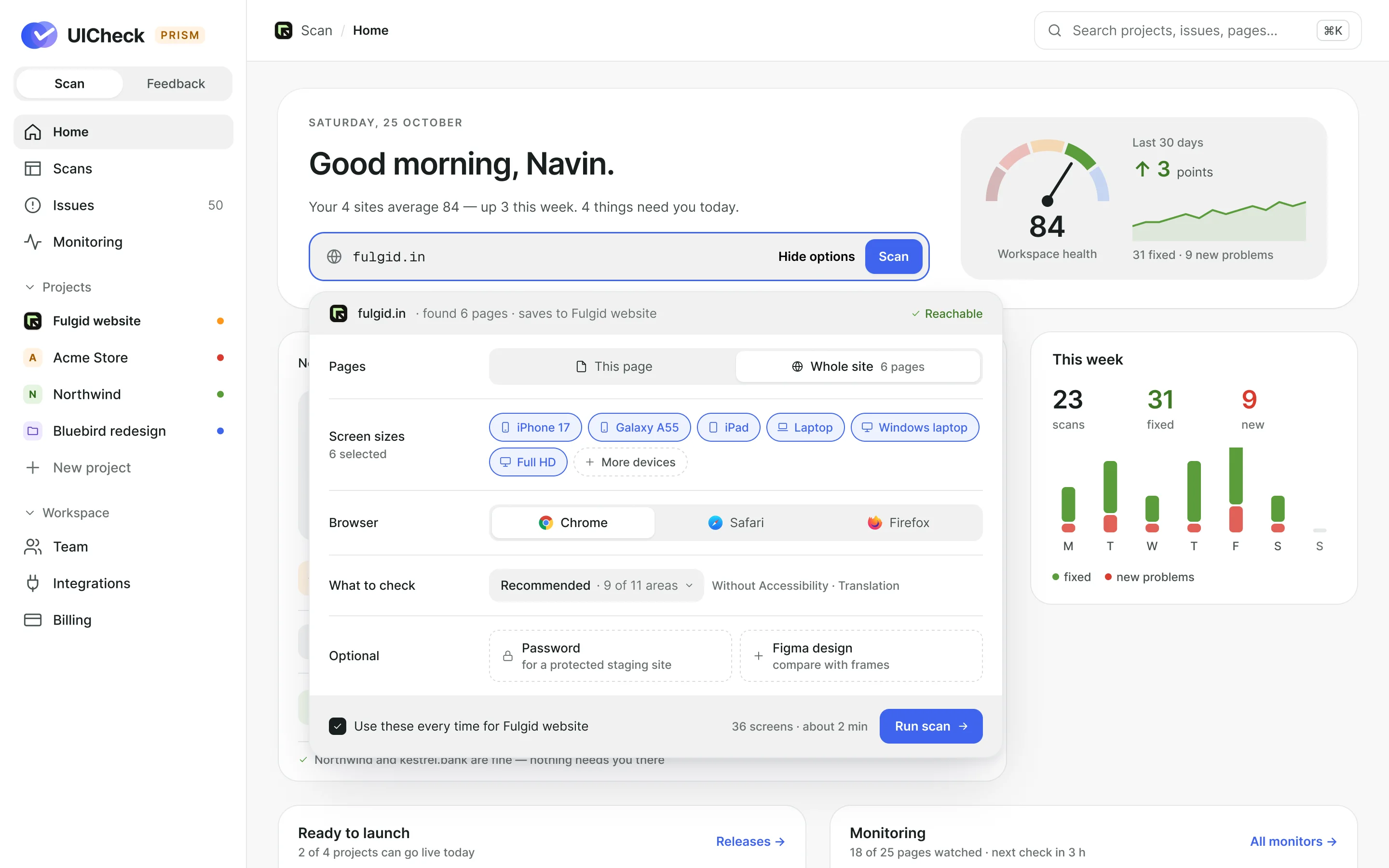
Bugs hide on the pages nobody opens before launch. Paste the home page: UICheck finds your pages, tests each one on every screen size in Chrome, Safari or Firefox, and emails you one report.

Free account, Lens and Prism for this feature, no cardJump to what it finds

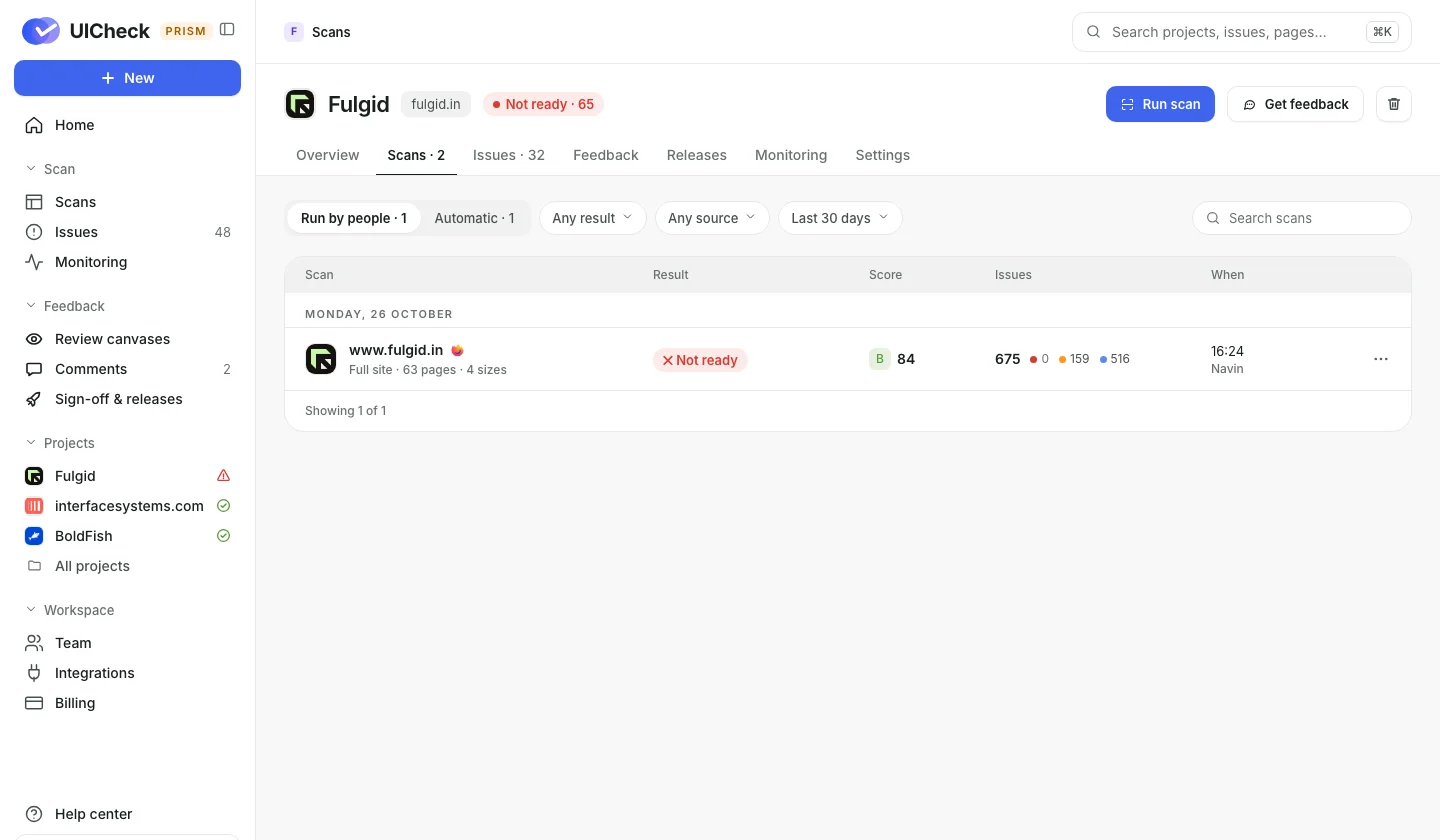
A full-site check of 63 pages in the project’s scans
  • Sitemap and linksEvery page found, up to your plan’s limit

  • Every page × every sizeOne report, worst pages first

  • Fix once, fixed everywhereShared parts like the header grouped

Why it matters

The page that breaks is usually one nobody opened. Launch reviews cover the home page and a few templates; the contact page, an old blog post or the careers page break on a phone and nobody sees it.

250 pages per check
Up to 15 on Lens, 250 on Prism, found from the sitemap and links.
3 browsers to choose
Every page in Chrome, Safari or Firefox.
1 report, emailed
Close the tab; the report is in your inbox when it’s ready.
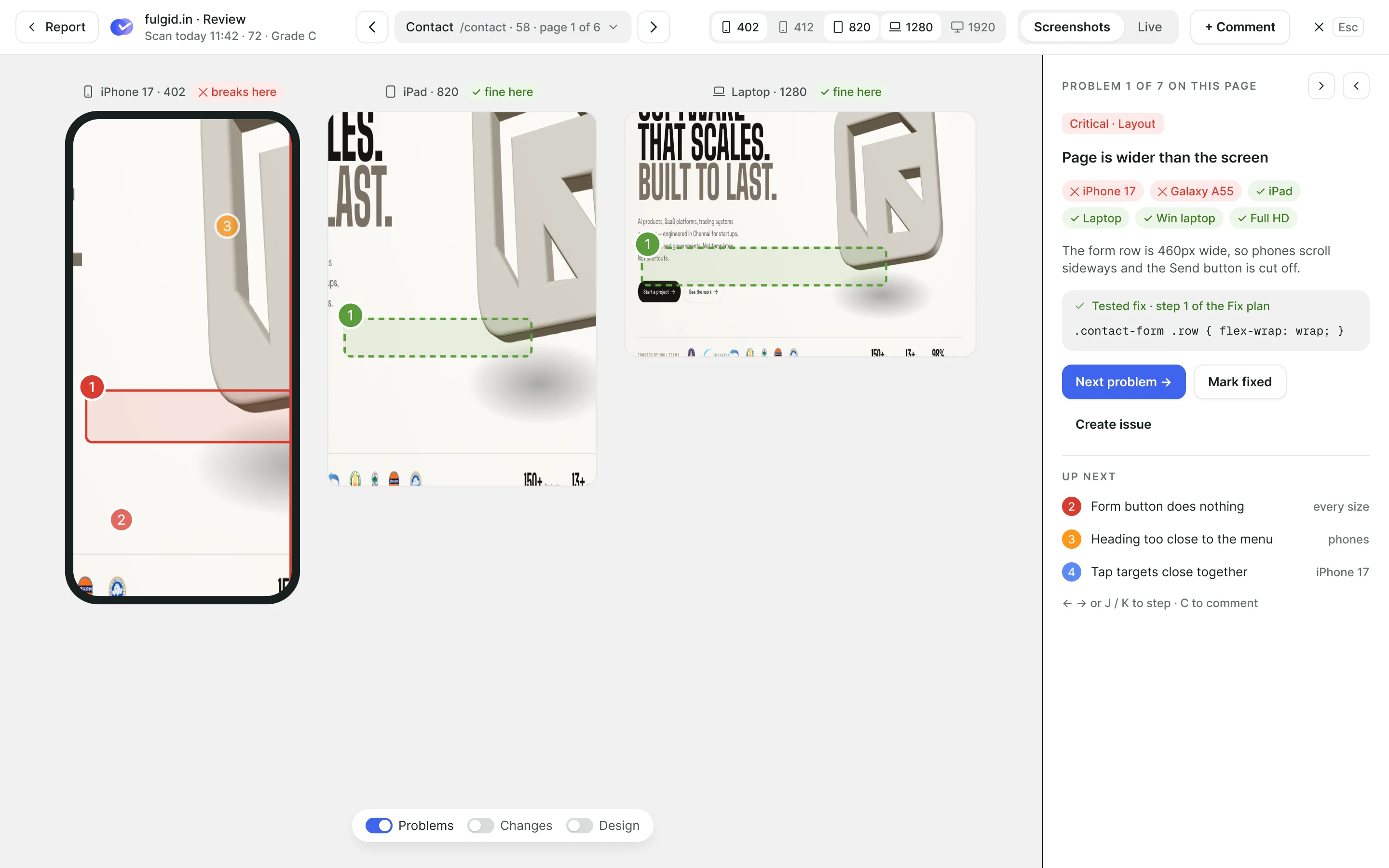
UICheck Review: Every problem pinned on the real page, at every size. Click a pin for the cause and a fix tested on your page.

Every problem pinned on the real page, at every size. Click a pin for the cause and a fix tested on your page.

1.0

It finds the pages you forgot to test

Paste the home page. UICheck works out which pages your site has, in this order, and stays on your site.

  • 01

    01Sitemap first

    Pages listed in sitemap.xml are queued first, so the pages you care about are checked even on large sites.

    Launch
  • 02

    02Then your links

    Links on your pages fill in what the sitemap misses: blog posts, landing pages, forms.

    Forms
  • 03

    03Never off your site

    Only your own domain is checked. Social links, payment pages and other sites are skipped.

    Launch

2.1

Every page and screen size at a glance

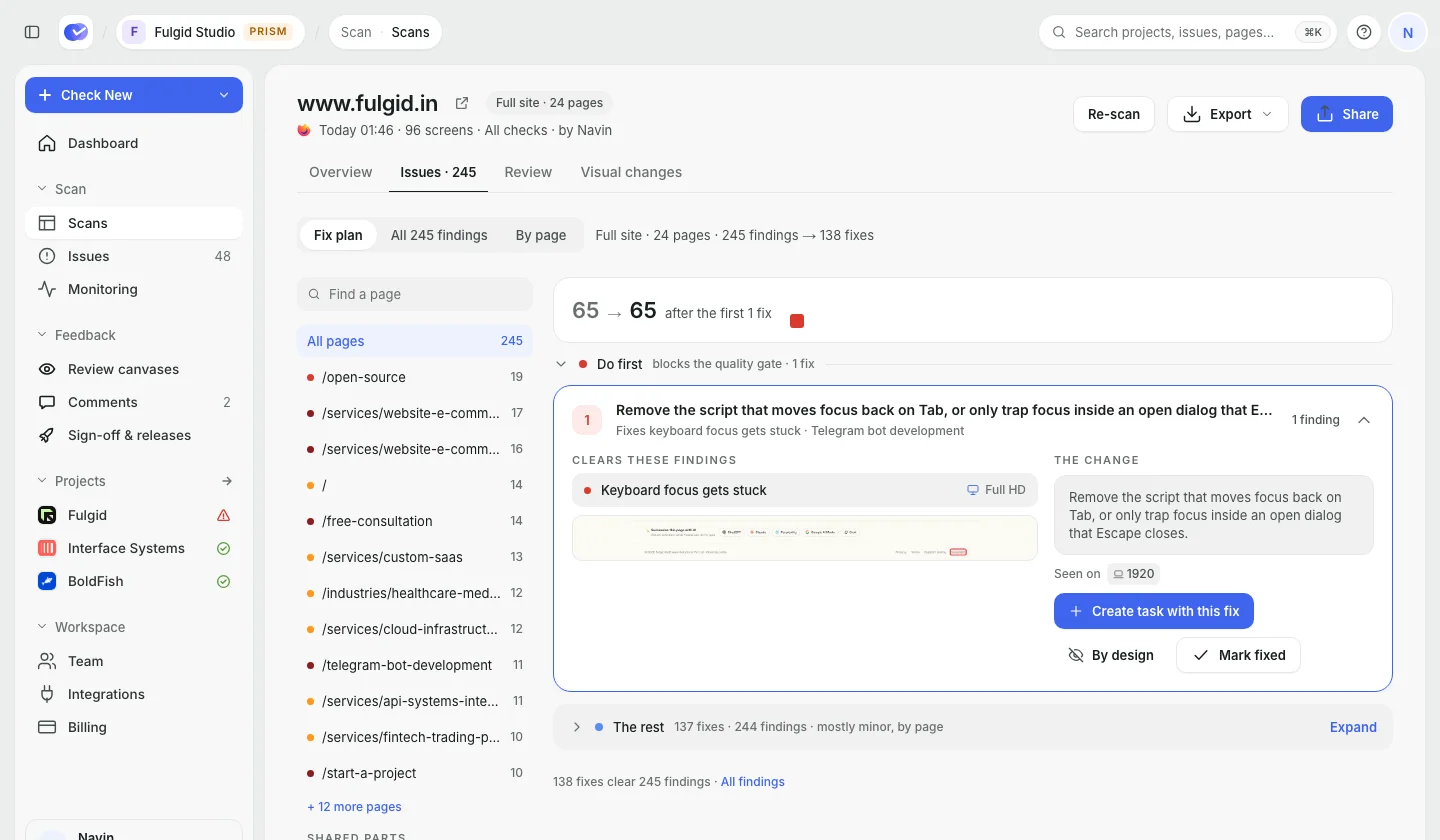
  • Scores per page and screen size, worst first
  • Each problem outlined on a screenshot, with the fix in plain words
  • Share a read-only link, or export PDF and Excel for the client
  • Mark findings as fixed or by design; the next check confirms them
The fix plan: each problem with the change that fixes it

2.2

The whole site in Chrome, Safari or Firefox

Safari and Firefox are part of Lens and Prism.

Chrome Chromium

Chrome, Edge, Samsung Internet and most Android browsers.

Safari WebKit

Safari on Mac, and every browser on iPhone and iPad.

Firefox Gecko

Firefox on desktop and Android.

2.3

From a landing page to a full agency site

Weekly monitoring re-checks your key pages and emails you only when something changes.

Free

1

page

Lens

15

pages

Prism

250

pages

3.0

Your whole site, checked while you work

No install, no scripts and no access to your code.

  1. 01

    Paste your home page

    UICheck finds your pages from the sitemap and links, staying on your own site.

  2. 02

    Close the tab

    A full-site check takes a few minutes. We email you the moment the report is ready.

  3. 03

    Share one report

    Every page and screen size in one place, with a PDF or Excel export for the client.

Checking a site you work on every week? Monitor it →

4.0

Check every deploy, from wherever you work

Run the same check from your terminal, your CI pipeline, a Playwright test or your AI assistant. The build fails when the quality gate does.

$ npx @uicheck-cli/cli run --url https://staging.client.com \

--fail-on critical

Checking 5 sizes in Chrome…

✗ Critical  Page scrolls sideways at 402px (.hero-table)

! Major     Menu covers the logo at 820px (header nav)

✓ Every other check passed

Report  https://uicheck.app/app/checks/…

Exit 1 · quality gate failed

5.0

Built for people who ship sites every week

Whether you hand sites to clients or keep one product working, the same check fits how you already work.

Agencies

Check every client site before launch

Run a full-site check on staging, send the PDF report in your own branding (Prism), and get sign-off on the pages that matter.

  • Up to 250 pages a check
  • White-label PDF and Excel
  • Client comments on the live page

Product teams

Stop layout bugs at the pull request

Add one step to CI and the build fails when a page scrolls sideways or text is cut off at any size.

  • GitHub, GitLab, Bitbucket
  • Playwright plugin
  • Monitoring after launch

Freelancers

Look thorough without a device lab

5 checks a day are free. Share a read-only report link so your client sees every size you tested.

  • Free plan, no card
  • Share link for clients
  • Fix tested on the page

6.0

UICheck vs checking page by page

Opening every page at every size by hand is what full-site checks do for you, with the pages found for you.

WhatUICheckChecks it for youBy handResponsive viewers
PagesFound from the sitemap and linksThe ones you rememberOne page at a time
Per checkUp to 15 pages on Lens, 250 on PrismAs long as it takesOne page
Shared partsA header bug on every page is one fixFound again on each pageFound again on each page
ReportA pages table, worst firstNotesScreenshots

Guide

Website pre-launch checklist: how to test a website before launch

Most launch-day problems are small and boring: a staging noindex that went live, a menu that spills off one phone, a contact form that never says it sent. This website QA checklist covers what to test before a site goes live, in the order that catches the costly mistakes first.

01Search and sharing: the mistakes that hide a site

Check these on the live address right after launch, because staging settings often travel with the site.

  • No noindex meta tag or X-Robots-Tag header, and robots.txt doesn’t block the pages
  • The canonical tag points at the live address, not staging or localhost
  • Every page has a unique title (about 50–60 characters) and a meta description
  • og:image is set with a full https:// address, so link previews show a picture
  • A favicon, and an XML sitemap submitted in Google Search Console

Watch outA noindex left over from staging is the most common launch mistake. It hides the whole site from Google until someone notices.
02Every screen size, not just yours

Test at the sizes visitors use: phones around 360–430px, tablets at 768–1180px, laptops at 1280–1536px and Full HD. Look between breakpoints too: many layouts break at a width nobody designed for.

  • No sideways scrolling on any phone width
  • No cut-off or overlapping text, buttons and images
  • The menu opens, closes and fits the screen
  • Buttons and links are big enough to tap
  • Images fit and aren’t stretched or squashed

03Browsers

Chrome, Safari and Firefox render the same CSS slightly differently. Safari matters most: it is the only browser engine on iPhones. Test in Safari even if your team works on Windows.

04Links, forms and errors

  • No broken links, including the ones in closed menus and the footer
  • Every form sends, shows a clear success message, and reaches the right inbox
  • Required fields and wrong emails show an error next to the field
  • No errors in the browser console and no images that fail to load
  • Links and files no longer point at the staging site

05Accessibility basics

  • Text contrast of at least 4.5:1 (3:1 for large text)
  • Every field has a visible label; every image that says something has alt text
  • The whole page works with the keyboard, with a visible focus outline
  • One H1 per page and headings in order

06Speed and stability

Pictures should be no larger than they are shown and saved as WebP or AVIF; images below the first screen should load lazily. Give images a width and height so the page doesn’t jump while it loads.

The full guide has every step, the checklist and its questions.

Read the full guide →

Free tool · no account

Try the Broken Link Checker

Every link on a page, menus included: pages that are gone, server errors, dead domains.

Check a page free

8.0

What you get on each plan

Start free on one page and five common sizes. Upgrade when you need every size, every browser and every page of the site.

Full-site checksFree$0Lens$5 / monthPrism$50 / month
Full-site checks—
Checks a day520Unlimited
Screen sizes5 common sizesEvery size + device listEvery size + device list
BrowsersChromeChrome, Safari, FirefoxChrome, Safari, Firefox
Pages per check1Up to 15Up to 250
Fixes tested on your page
CI and AI assistants

10.0

Questions

The short version. The help pages go into every check in detail.

How does UICheck find my pages?

It reads your sitemap first, then follows links from your pages. It never leaves your domain, so third-party pages are not checked.

How many pages can I check?

Lens checks up to 15 pages and Prism up to 250 in one check. Free checks one page at a time.

How long does it take?

A few minutes for most sites, depending on the number of pages and screen sizes. You can close the tab; we email you when the report is ready.

Can I check the whole site in Safari or Firefox?

Yes. Pick the browser when you start the check and every page is tested in it.

Does the breakpoint sweep run on every page?

It runs on the first 10 pages of a full-site check, after the screen sizes.

Can I hand the report to a client?

Yes. Share a read-only link, or export a PDF or Excel report with plain-language fixes. On Prism the exports can carry your agency’s logo and colours.

Test the pages nobody opens before launch

Lens is $5 a month: full-site checks up to 15 pages, every screen size, Safari and Firefox.